Free tools
$0
2 remediated PDFs/mo (up to 10 pages)
Best for: Anyone checking a PDF, on Mac or Windows
ADA Title II · PDF/UA-1 · WCAG 2.1 AA
Tag agendas, board packets and budgets so screen readers can read them. No Acrobat, no sales call.
ADA Title II applies to public schools, colleges and local governments. PagePass helps them fix the PDFs already on their sites, not just new ones.
How it works
Drop in a PDF
We list what stops a screen reader from reading it.
A sample board meeting agenda is checked. Three problems are flagged: the title is not tagged as a heading, the chart has no description, and the table has no header cells. A screen reader would read one long run of text with no headings to jump to, and skip the chart.
The review
veraPDF, automatically
Your review, by a person
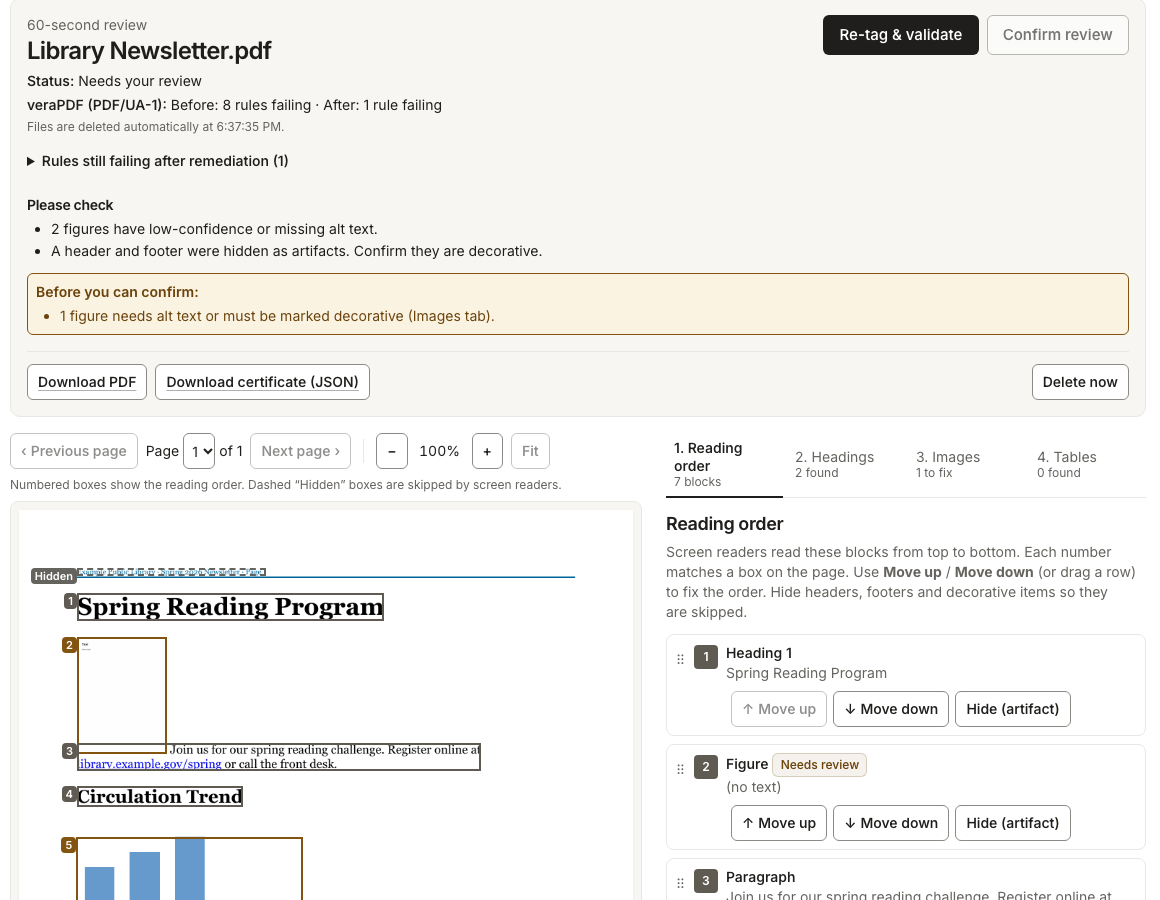
No automated checker can judge the second list, so we flag those items for a person.
ADA Title II covers PDFs posted by state and local governments, schools, colleges and libraries.
Public entities serving 50,000+ people
Entities under 50,000 and special districts
Dates as extended by the DOJ in April 2026. General information, not legal advice.
Check our work
A 10-page U.S. Department of Health and Human Services data brief, run through PagePass. Download the files and reports, or re-run the check with veraPDF, the free, open-source validator we use.
Data Point: Age-Adjusted Death Rate
HHS (ASPE) · Public domain ·original source
Agendas, council packets and permit forms.
Board packets, handbooks and lunch menus.
Syllabi, course readings and catalogs.
Event calendars and board minutes.
Notices, rate sheets and annual reports.
Web and design shops fixing client PDFs.
By category. Check each vendor’s current terms.
Fixes the PDF itself
Typical cost
Turnaround
$0
2 remediated PDFs/mo (up to 10 pages)
Best for: Anyone checking a PDF, on Mac or Windows
$19 / $49
50 or 200 pages
Best for: One-off jobs, freelancers, small nonprofits
Recommended for most teams
$39 per month
150 pages/mo
Extra pages: $24 per 100
Best for: A school or department that posts PDFs every month
$129 per month
600 pages/mo
Extra pages: $20 per 100
Best for: Any team clearing a backlog: towns, districts, agencies
$299 per month
2,000 pages/mo
Extra pages: $15 per 100
Best for: Cities, colleges and large districts
About 2,400 pages to fix. A page is one PDF page, so a 12-page agenda uses 12.
Lowest total: Organization, $359 (1 month + 400 extra pages)
Review: about 5 hours in total, at about a minute per typical document.
| Plan | How | Total |
|---|---|---|
| Page packs | 12 × 200-page pack | $588 |
| Pro | 1 month + 2,300 extra pages | $591 |
| Team | 1 month + 1,800 extra pages | $489 |
| OrganizationLowest | 1 month + 400 extra pages | $359 |
Extra pages are prepaid in blocks of 100 and used while your plan is active, so there’s never a surprise bill. Large totals can be split to fit a P-card limit.
The free checker runs in your browser.
Files sent for fixing, unless you delete them sooner.
Google Gemini (paid API) and Reducto process files only to tag them. Their terms rule out training on your data.
No. Software does about 90% of the tagging. A person judges the rest in our visual reviewer, like whether alt text describes the image or a table's headers are right. Then veraPDF checks the file against PDF/UA-1.
Maybe not all of them. The ADA Title II rule has exceptions for archived content and for documents posted before your compliance date, but they are narrow. Documents people still use to apply for or take part in a service, like current forms, fee schedules and upcoming agendas, generally have to be accessible. Our website scanner helps you sort what is still in use. This is general information, not legal advice; check with your attorney.
The U.S. Department of Justice's ADA Title II rule requires state and local governments to make their web content, including the PDFs they post, meet WCAG 2.1 Level AA. PDF/UA-1 (ISO 14289-1) is the international standard for accessible PDFs, and most teams use it to make a PDF meet WCAG.
Not by itself. A veraPDF pass means the file meets every PDF/UA-1 rule a machine can check; some things only a person can judge. We can’t give legal advice or promise legal compliance.
Yes. It runs in a web browser on Mac, Windows, Linux or a Chromebook. No Adobe Acrobat or other software to install.
See what fails and what a screen reader will read.
Drag and drop a PDF here, or choose a file.
Your file never leaves your browser.